


Key specs
In Depth
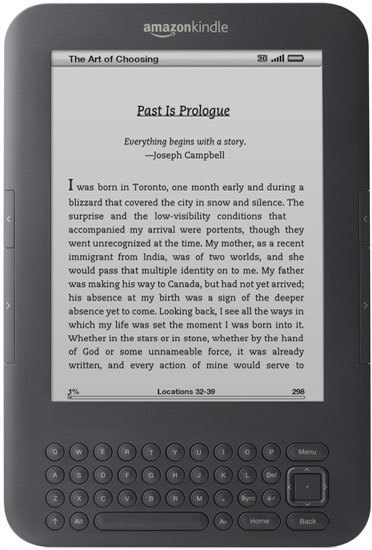
The Amazon Kindle Keyboard, previously called the Amazon Kindle Wi-Fi, is the third generation reading device sold by Amazon. It offers improvements over the second generation which include a design that is both slimmer and lighter weight to go along with a screen that features a faster refresh rate. Does this make it worth the upgrade if you already have an earlier model? In some cases, absolutely.
The most obvious change is the 50% increase in the e-ink screen’s contrast ratio. The text can be easily mistaken for print and is deep black which makes it as easy to read as any book even when in direct sunlight. It is also far easier to read than a traditional LCD screen as found on other e-readers and tablets. Another benefit is that e-ink does not consume power until you turn the page, allowing the battery of the Kindle Keyboard outlast the competition.
More changes include doubling the storage space of the device from 2GB to 4GB, making the Kindle Keyboard able to store around 3,500 books. Battery life is also improved and now will last an average of four weeks compared to two weeks on older Kindle models.
Kindle Keyboard also introduces the experimental Webkit browser. While it does make browsing the internet possible on the device, it clearly is an experimental design and has some flaws at the moment. Also, while e-ink is fantastic for reading books, it makes for a boring and drab web page. Another new feature is native support for PDF files.
Overall, while it might lack some features of other tablets and e-readers, this Kindle makes up for it with impressive battery life and an awesome e-ink display.
Need to Know: Amazon Kindle Keyboard
1. The e-ink display is by far the best display for reading books. (The Good)
2. Battery life is far and away better than the competition, lasting for an average of four weeks before needing a charge. (The Good)
3. Grayscale screen can make for some drab pictures or charts if your books contain these. (The Bad)
4. Experimental web browser feels clunky, though Amazon has said they will update it in the future. (The Bad)
What people actually want to know
When was the Kindle Keyboard released?
The Kindle Keyboard was released on August 27, 2010.
How long does the battery last on the Kindle Keyboard?
The Kindle Keyboard has a 1,530 mAh battery.
Where can I download the Kindle Keyboard manual?
You can view and download the Kindle Keyboard manual on our dedicated manual page.
Questions & answers
Have a question about the Kindle Keyboard? Ask it here and we'll email you as soon as someone answers.
Finish the security check above to post your question.
Your name shows with your question.
✓ Question submitted. We'll notify you when someone answers.
We sent a verification link to . Click it to publish your question.
Can't find it? Check your spam folder.

New eReaders, honest advice.
One email when something worth knowing changes. No deal spam, no filler.